
Road Trip Charging: How to Keep Everyone's Devices Powered in the Car
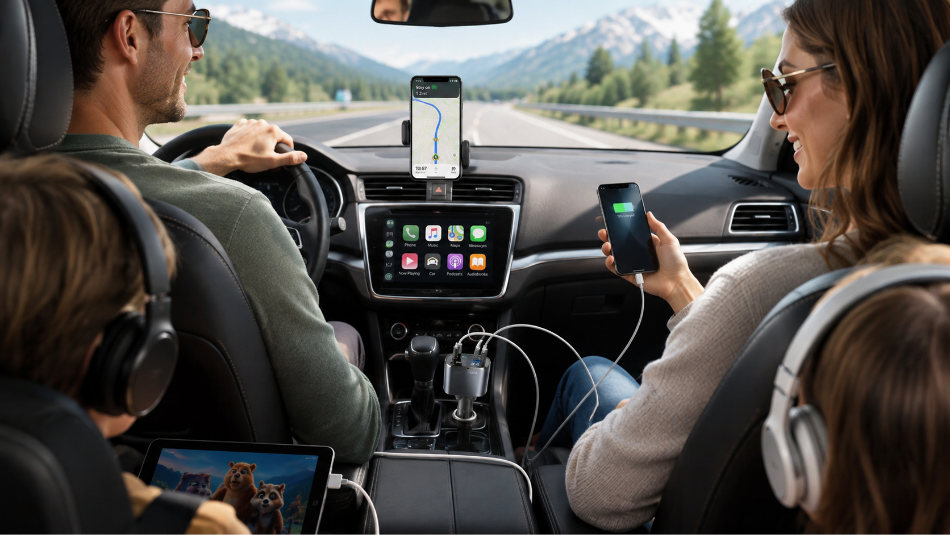
A long drive can turn into a charging problem surprisingly quickly.
One person is using a phone for navigation. Someone else is streaming music. A passenger is watching videos or playing games. Wireless earbuds need power. Another phone started the trip at 40%. By the time everyone realizes how many devices are competing for electricity, the vehicle's available charging ports are already occupied.
That is why a good road trip charging setup should be planned before you leave.
You do not need to fill the car with chargers and cables. You need a simple system that combines vehicle charging, portable backup power, the right cables, and a few battery-saving habits.
The goal is to keep the devices that matter powered throughout the drive without constantly swapping cables or arguing over who gets the charger next.
Here is how to build a practical charging setup for your next road trip.
1. Count the Devices Before You Count the Chargers
Start with the people traveling in the vehicle.
Then count the devices they are likely to use.
For a family or group of four, that could easily include:
Four smartphones
Wireless earbuds
Headphones
A tablet
A portable speaker
Other small USB-powered accessories
Not every device needs to charge simultaneously, but knowing what is coming with you makes it much easier to plan.
Next, decide which devices are essential.
A phone being used for GPS navigation should usually receive higher charging priority than a passenger's entertainment device.
The driver's phone may also be handling:
Navigation
Traffic information
Calls
Music
Reservations
Hotel information
Emergency communication
That device should not be allowed to reach 5% while another passenger keeps a tablet at 100%.
Road trip charging works better when you think of available power as a shared resource.
2. Start the Trip With Everything Charged
The easiest electricity to manage is the electricity you already have.
Charge your phones before leaving.
Charge your portable power bank.
Charge wireless earbuds and headphones.
Charge tablets.
If you are bringing a rechargeable Bluetooth speaker or another portable accessory, charge that too.
Starting with several half-dead devices creates an unnecessary charging backlog before the trip has really begun.
This is particularly important for a portable power bank.
A power bank should be treated as stored backup energy—not another empty battery you plan to deal with later.
If you are using the SignalRoot IP65 Waterproof Solar Power Bank, charge it normally before departure. Its integrated solar capability is intended primarily as supplemental or emergency charging support rather than the fastest way to fully recharge the battery.
That gives you stored power ready to use when someone leaves the vehicle, when all available car-charging connections are occupied, or when you simply want another charging option.
3. Make a Multi-Port Car Charger the Center of the Setup

If several people need power, relying on a single USB port quickly becomes frustrating.
A multi-port car charger lets the vehicle become the main charging hub while you are driving.
That means multiple compatible devices can receive power without passengers repeatedly disconnecting one another.
For a road trip, this is usually the most efficient place to start because the vehicle is already supplying power while you travel.
Instead of thinking:
"Who needs the charger?"
you can think:
"Which devices need to be connected right now?"
That is a much easier problem.
SignalRoot's live Power & Charging catalog includes vehicle-charging options designed to give drivers more useful charging capability on the road.
When choosing which ports to use, match the connection and charging capability to the device rather than assuming every port and cable combination behaves identically.
Your phone, cable, charger, and charging protocol all influence the final charging performance.
4. Give the Navigation Phone Priority

One device should almost always sit at the top of the road-trip charging hierarchy:
the phone providing navigation.
Losing navigation in an unfamiliar area because the phone battery died is much more disruptive than having a passenger pause a video.
If the driver's phone is being used for GPS, keep an eye on its battery level throughout the trip.
Navigation can keep the screen, cellular connection, and location services active for long periods.
If that same phone is also handling music or calls, its battery demand can increase further.
A simple rule works well:
Do not wait for the navigation phone to become critically low before charging it.
Keep it comfortably powered throughout the drive.
This also means placing the appropriate charging cable within easy reach before you leave.
Do not create a situation where the driver has to search through a bag for a cable while driving.
Set up the navigation device and charging connection while the vehicle is parked.
5. Give Every Cable a Job
Cables create more road-trip clutter than chargers if you do not organize them.
A car containing four people and six random cables can somehow still end up with nobody having the cable they need.
Before the trip, identify which connectors your devices use.
Depending on your equipment, you may need compatible:
USB-C cables
Lightning cables
USB-A connections
Other device-specific charging connections
Bring what your actual devices require.
Bring the Thunderbolt USB-C Cable
Do not pack five cables simply because they happen to be in the charging drawer.
A better system is to assign cables by purpose.
For example:
Front-seat cable: Navigation phone
Passenger cable: Secondary phone
Rear-seat cable: Passenger devices
Backup cable: Stored in travel bag
If several people use the same connector, you can simplify the setup.
If everyone uses different devices, label or organize the cables so passengers are not constantly untangling and swapping them.
Keeping the equipment organized matters too. See 10 practical Bluetooth item finder uses for ideas covering luggage and travel bags.
6. Keep Charging Cables Under Control
Loose cables across a vehicle are annoying and potentially distracting.
Keep cables away from:
The steering wheel
Pedals
Gear controls
Parking brake controls
Driver footwell
Other vehicle controls
Use only enough cable length to reach the intended device comfortably.
Excess cable can be loosely organized rather than left hanging across the console.
Passengers should also avoid routing charging cables where they can easily be pulled, stepped on, or caught when someone enters or exits the vehicle.
Good cable management does not have to look elaborate.
It simply needs to keep the driver's area clear and make each connection easy to use.
7. Bring a Portable Power Bank as the Second Layer

A car charger solves the problem while you are in the vehicle.
A portable power bank solves a different problem:
What happens when you get out?
Road trips involve plenty of time away from the car.
You may stop at:
Rest areas
Restaurants
Attractions
Parks
Hiking trails
Hotels
Events
Scenic overlooks
Beaches
Campsites
If someone's phone is low when you arrive, disconnecting it from the vehicle ends the charging session.
A portable power bank allows the charging to continue.
The SignalRoot IP65 Waterproof Solar Power Bank is designed for portable backup charging during road trips, travel, outdoor activities, emergencies, and other situations where normal wall power may not be available.
That makes the car charger and power bank complementary rather than competing products.
Car charger = primary charging while driving
Power bank = portable charging when away from the vehicle
This is a much stronger travel setup than relying on either one alone.
For more situations where outlets aren't available, see how to keep your phone charged when you're away from an outlet.
8. Don't Rely on Solar as Your Primary Road Trip Charger
A solar power bank can be useful on a road trip, particularly if the trip includes camping or extended outdoor activities.
But use the solar feature realistically.
A compact integrated solar panel does not replace normal wired charging.
Sunlight strength, panel position, weather, shade, season, and exposure time can all affect solar charging.
The better strategy is:
Before leaving: Charge the power bank normally.
While driving: Use appropriate vehicle charging when available.
At hotels or destinations: Recharge from conventional power when practical.
When conventional power is unavailable: Use solar as supplemental backup under suitable conditions.
This gives you multiple layers instead of depending on the least predictable charging method.
Solar is useful because it provides another option.
It does not mean you should begin the trip with an empty power bank.
9. Use the Power Bank During Stops Instead of Fighting Over Car Ports
Imagine four people have been charging different devices during the drive.
You arrive at a destination and everyone gets out.
One person's phone is still at 25%.
That is where the power bank becomes useful.
Instead of leaving the phone inside the vehicle to continue charging, the person can carry compatible portable power with them.
This is particularly helpful if the stop involves navigation, photography, tickets, mobile payments, or other phone use.
The same approach works at a hotel when outlets are inconvenient or already occupied.
Road trip charging becomes much easier when electricity moves with the traveler instead of always requiring the traveler to remain next to the electricity.
10. Save Battery When You Don't Need Full Performance
Charging is only half of the solution.
The other half is reducing unnecessary battery consumption.
Lower Screen Brightness
Passengers watching content do not necessarily need maximum brightness.
The navigation phone may also be able to use a lower comfortable brightness depending on conditions.
Use Battery-Saver Mode
If a device is dropping faster than expected, activate its built-in battery-saving features.
Download Entertainment Before Leaving
Downloading movies, music, podcasts, maps, or other content before the trip can reduce dependence on continuous streaming.
Turn Off Unneeded Connections
If a passenger does not need Bluetooth, WiFi, or other wireless features, turning off unnecessary connections may reduce some battery activity.
Do not disable services needed for navigation, emergency communication, or safety.
Lock the Screen When You're Not Using It
A phone sitting unused with its display active is simply wasting power.
Small battery-saving habits become more valuable on an eight-hour drive than they are on a ten-minute commute.
If your phone is plugged in but still losing battery, see why your phone won't stay charged in the car.
11. Download Maps Before Traveling Through Weak-Signal Areas
Road trips sometimes take you through places where cellular coverage becomes inconsistent.
Your phone may work harder searching for a signal, while navigation becomes more important because you are farther from familiar roads.
Before the trip, consider downloading appropriate offline maps when your navigation app supports them.
Also save:
Hotel addresses
Reservation information
Important destination details
Tickets
Relevant contact information
This has two advantages.
First, you are less dependent on cellular service.
Second, you may reduce some unnecessary searching and repeated phone use when connectivity becomes unreliable.
Technology works better on a road trip when important information is prepared before you need it.
12. Keep the Driver's Charging Setup Simple
The driver's area should be the least complicated part of the charging system.
Set everything up before moving.
The driver should have:
Phone mounted or positioned appropriately
Navigation configured
Charging cable connected if needed
Cable routed away from vehicle controls
Audio configured
Destination entered
Passengers can manage their own charging needs.
The driver should not be passing cables around, changing chargers, searching through bags, or troubleshooting someone else's device while the vehicle is moving.
Convenience should never create distraction.
If something needs attention, have a passenger handle it or wait until the vehicle is safely stopped.
13. Build a Rear-Seat Charging Plan
If children, teenagers, or other passengers will be using devices in the back seat, plan for them separately.
This is where a multi-port charging arrangement becomes particularly valuable.
Instead of routing every device toward the front console, determine how passengers will access appropriate charging connections without creating a web of cables through the vehicle.
Also establish a simple charging priority.
For example:
Phones needed for communication
Navigation device
Devices with very low batteries
Entertainment devices
Accessories
You do not need to enforce this like an airline checklist.
It simply gives everyone a reasonable understanding of what happens if available charging capacity becomes limited.
14. Don't Forget the Return Trip
One of the most common travel mistakes is planning extensively for the trip out and almost not at all for the trip home.
You arrive at the hotel.
Everyone uses their devices.
Someone forgets to charge the power bank.
Another person leaves a cable plugged into a hotel outlet.
Then the return trip begins with less power and fewer charging accessories than the original drive.
Before leaving your destination, reset the system.
Charge the phones.
Recharge the power bank.
Collect the cables.
Check the car charger.
Charge earbuds and other accessories.
Pack everything in its normal location.
Treat the return drive as a second road trip rather than assuming whatever battery remains will be enough.
15. Keep a Small Charging Kit in the Vehicle
If you take road trips regularly, you may not want to rebuild the charging setup every time.
Create a small vehicle charging kit.
It might include:
Multi-port car charger
Compatible charging cables
Spare charging cable
Cable organizer
Portable power bank when appropriate
Keep the kit organized so you know what belongs in the vehicle.
This also makes the setup useful beyond vacations.
The same equipment can help during:
Daily commuting
Work travel
Long appointments
Traffic delays
Unexpected trips
Roadside emergencies
A well-planned road-trip charging kit is really a more organized version of everyday vehicle charging.
You can also use many of these same products to build an emergency phone charging kit.
How Many Charging Ports Do You Need for a Road Trip?
There is no perfect number.
It depends on the number of people and devices.
A couple traveling with two phones may need relatively little.
A family carrying four phones, tablets, earbuds, and other accessories has a different problem.
Instead of trying to provide one charging port for every device in the car, think about how many devices realistically need to charge at the same time.
If most devices begin the trip fully charged, simultaneous demand should be lower.
A multi-port car charger then gives you flexibility as battery levels change throughout the drive.
Add a charged power bank, and you gain another independent source of portable power.
The goal is not unlimited charging.
It is enough charging capacity that nobody needs to constantly negotiate for a single connection.
Car Charger or Power Bank: Which Is Better for Road Trips?
For a road trip, the strongest answer is often:
both, because they solve different problems.
A car charger is ideal while the vehicle is running and appropriate charging power is available.
It does not need to carry stored energy because the vehicle provides the power.
A power bank stores energy so you can take it with you.
That makes it useful when:
You leave the car
You stop for several hours
You are walking around a destination
You are camping
You need another charging source
Vehicle charging is unavailable
Think of the car charger as the foundation.
Think of the portable power bank as the backup and mobile extension.
What Should Be in a Road Trip Charging Kit?

A practical setup does not need to be large.
Start with:
Multi-port car charger
Correct charging cables
At least one spare cable
Charged portable power bank
Cable organizer or small storage pouch
Before departure, add one more thing:
fully charged devices.
That combination solves most normal road-trip charging problems without filling the vehicle with unnecessary accessories.
Keep the Power Where You Need It
A good road trip should not revolve around battery percentages.
You should be thinking about the destination, the people in the car, the music, the stops, and what you are going to do when you arrive.
The easiest way to make that happen is to solve the charging problem before you leave.
Start with full batteries.
Use a multi-port car charger as the primary charging hub while driving.
Bring the correct cables.
Keep the driver's charging setup simple.
Carry a portable power bank for stops and time away from the vehicle.
Use supplemental solar charging realistically when conventional power is unavailable.
And conserve battery when you know charging opportunities may become limited.
SignalRoot's Power & Charging and Travel Tech products are built around exactly these everyday problems: keeping compatible devices powered and useful when you are away from the outlets you normally depend on.
A road trip does not need more technology.
It needs the technology you already carry to keep working.

Build your SignalRoot road trip charging setup before the next long drive and keep the power moving with you.


Comments